CHROMA KEY NOTES / 004
When a Green Screen Remover Is the Wrong Tool
A green screen remover is the wrong tool when the frame has no solid screen, when the subject itself contains the key color, or when the job is footage or a large batch. In those cases use AI subject segmentation, a video editor with keying, or a scripted pipeline. A color key can only delete pixels near one chosen color that are connected to the edge of a still image, and no tolerance setting widens that definition into a general background remover.
Open the green screen remover ↗
What the tool actually decides, pixel by pixel
The most useful way to describe a boundary is to describe the decision the tool makes, because the decision is small and fixed. Our implementation reads the image into a canvas, computes a score for every pixel, and marks a pixel as a key candidate when that score falls under a threshold. With the green preset and the default tolerance of 24, the cutoff is 56.4 and the threshold is 198.6. The score is 255 minus the green excess, where green excess is the gap between the green channel and the larger of the red and blue channels, scaled by the total brightness. In plain terms: a pixel qualifies only if green clearly dominates it.
Two more rules matter. Candidates are then flood-filled from the four edges of the frame with eight-neighbour connectivity, and only pixels connected to that perimeter are cleared. Enclosed pockets of three or more candidates inside the subject are cleared too. The edge rule is a deliberate protection: a green button on a jacket will not be erased just because it matches, as long as it is not connected to the green backdrop. Finally the export is a single call that writes one PNG from the canvas. There is no frame loop, no file queue, no alpha video container, and no learned model of what a person or a product looks like.
Those four facts - one dominant color, edge connectivity, one image, one PNG - are the whole contract. Any job that breaks one of them is not a job for this tool. That is not a limitation to hide. It is the reason the tool can run entirely on your device without an account, and it is also the reason it can honestly tell you when it cannot help: if no candidate connects to the edge, it reports that no matching screen color was found instead of fabricating a cutout. General-purpose background removal is a different product with a different cost.

Three measured frames, three different answers
To make the boundary concrete rather than rhetorical, we ran the tool's own scoring rule over three 640 by 420 frames in pure Python, with no image libraries. The first frame is the studio sample bundled with the tool itself. The second is a synthesized product shot against an off-white wall with a soft shadow and a gentle brightness gradient - the kind of frame described by people who shoot talking heads or small objects without a physical screen. The third is a synthesized green plant in front of a green screen, where the foliage sits inside the same green-dominant band as the backdrop. All three were scored at tolerance 24, threshold 198.6, with the same eight-neighbour edge flood and the same three-pixel pocket rule.
Frame A behaved exactly as intended: 209,102 of 268,800 pixels were candidates and all of them were cleared, 77.79 percent of the frame, while the dark subject stayed intact. Frame B produced zero candidate pixels, zero edge-connected seeds, and zero cleared pixels. The tool would simply report that no matching screen color was connected to the image edge. Frame C produced 259,875 cleared pixels, or 96.68 percent of the frame, but the damage is the point: the subject occupied 36,849 pixels and 27,924 of them were deleted, a 75.78 percent loss. A cutout that removes three quarters of the plant is not a bad cutout, it is the wrong operation.
We also swept the tolerance across frame B at values 1, 24, 50, 75 and 100. The threshold rose from 183.7 to 247.0, and the candidate count stayed at exactly zero at every step. This is the measurement that matters most. Raising tolerance widens the radius of colors accepted around one center; it cannot manufacture a dominant green channel in a white wall. People often respond to a failed key by pushing the slider to the right. On a no-screen frame that gesture has no effect whatsoever, and the sweep shows why.
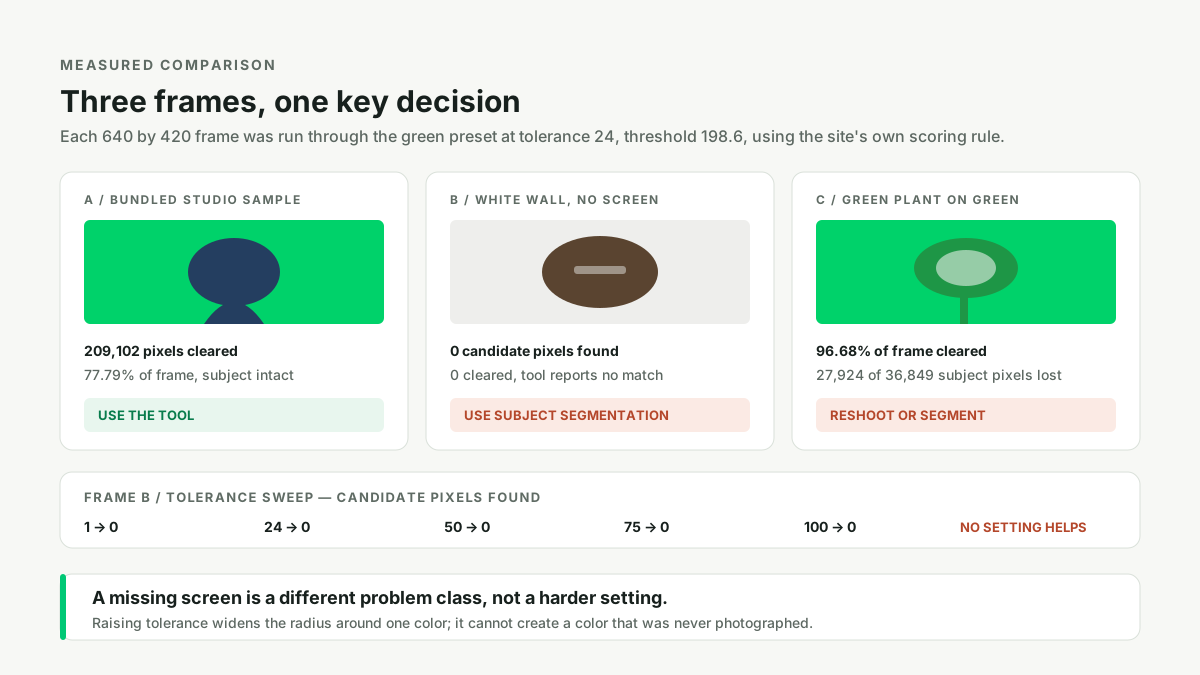
| Input frame | Candidates | Cleared | Subject loss | Verdict |
|---|---|---|---|---|
| A: studio green screen, dark subject | 209,102 | 77.79% | none | Use this tool |
| B: white wall, no screen | 0 | 0% | none | Use segmentation |
| C: green plant on green screen | 259,875 | 96.68% | 75.78% | Reshoot or segment |
| Tolerance sweep on B (1 to 100) | 0 at every step | 0% | none | No setting helps |
Upgrade path one: no screen, use subject segmentation
The clearest signal in our own logs is that people ask about backgrounds that were never photographed against a colored screen. One video editor described receiving product shots from an outside company and wrote: "My colleagues that worked with the company previously said they didn't use green screen, although they used a white backdrop at times," then added, "I can get it this perfect with a green screen but I don't have any luck in doing it any other way - how would they have cut the products out so well?" (Video Stack Exchange 24353). The answer is that a clean cutout on a white or natural backdrop comes from segmentation, rotoscoping, or careful masking, not from a color key. The tool has no concept of an object boundary, so it cannot be coaxed into producing one.
A second question makes the same point from the tooling side: "I'm looking for an ffmpeg-like tool to blur/remove/change a static background from a 'talking head' video, on the command line with on-device processing," and closes with "Does such a tool exist yet?" (Video Stack Exchange 33531). That request is for a frame-by-frame segmentation model wrapped in a command-line interface. A developer building a wound-image app put it even more plainly: "the algorithm will segment and remove the background from the image, leaving it with a black background and highlighting only that area of the wound" and "I need to segment the image" (Stack Overflow 61920859). Segmentation is the correct noun there. A per-pixel color test is not.
Our earlier writing on why a green screen remover fails covers what goes wrong when a screen does exist but is badly lit. That is a solvable problem here. A missing screen is a different problem class. Related but distinct issues, such as green spill on the subject and uneven screen lighting, also assume a screen is present. If it is not, skip all three pages and go straight to a segmentation tool.
Upgrade path two: footage and transparent video
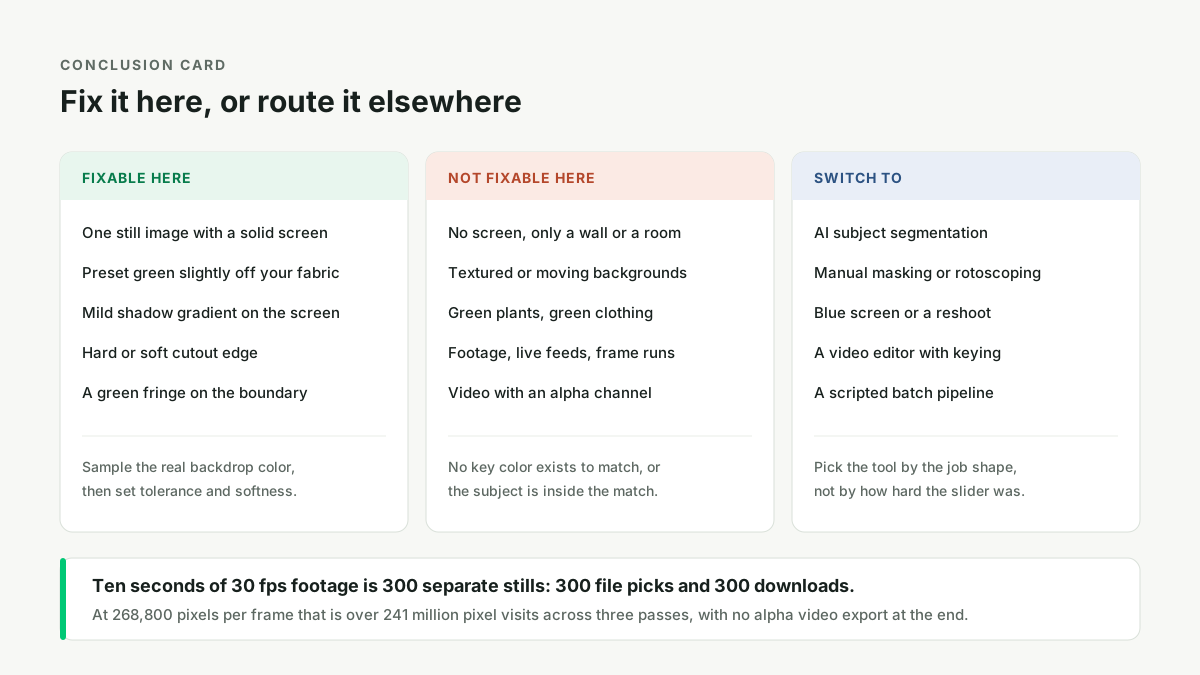
The single-image contract breaks immediately on video. Our implementation performs three full-frame passes per still - a candidate scan, an edge flood, and an edge refinement pass - which is 806,400 pixel visits for one 640 by 420 frame. Ten seconds of footage at 30 fps is 300 frames, so the same work becomes more than 241 million pixel visits, plus 300 manual file picks and 300 separate downloads if you tried to do it by hand. There is no queue, no frame loop, and no way to carry a key decision from one frame to the next, so temporal consistency - the thing that makes a video key look stable - is impossible by construction. The site states this plainly: video files can be selected, but transparent video export is not available in this version.
The format problem is independent of the keying problem. One user asked: "I am trying to convert a MOV (with alpha channel) to WebM and Mp4 (with Alpha channel) using FFmpeg. The WebM video is coming with the Alpha channel. But the video is not supported in SAFARI Browser" (Super User 1625419). Another hit the encoder wall directly and quoted the warning: "Incompatible pixel format 'bgra' for codec 'libx264', auto-selecting format 'yuv420p'", adding "My understanding is that there is an alpha channel in the pngs, which the x264 encoder cannot handle" (Super User 513915). H.264 in an MP4 does not carry alpha. If you need transparency in motion, choose a container and codec that do - ProRes 4444, a PNG image sequence, or WebM with alpha - and key the footage in a video editor or a scripted encoder. A still-image PNG exporter is the wrong last step in that chain, no matter how clean each frame looks. The underlying reasoning is the same one behind the symptom-to-cause table: identify which stage owns the problem before adjusting a control.
Upgrade path three: batches and green subjects
Scale is the third boundary. A designer asked "Is there a way to batch remove the same background from multiple images?" and explained the real friction: "the problem is all methods I know are manual, and large batches become pretty tedious," and "At the heart of this, it is about automating the process of removing the same background from every image" (Graphic Design Stack Exchange 46521). Our log has the same complaint in blunter language: "Obviously, doing this by hand is impractical" (Video Stack Exchange 29024) and "This will take years to be completed" (Stack Overflow 9009673). For dozens or thousands of frames, the right answer is a script that samples the backdrop once and applies the same parameters to every file, or a segmentation model running unattended. Interactive sliders are optimized for a human looking at one image.
The last case is the subject that shares the key color. A plant-store photographer wrote: "Usually, for product photos, we use a green screen background so that we can remove the background and use any background we want for the product. But for plants, I'm guessing this isn't an option, because we won't be able to remove the colour green without affecting the plant itself. Therefore what colour would you recommend to use for the screen background of the photos, so that it can later be easily removed?" (Photo Stack Exchange 116722). That intuition is exactly what frame C quantified. Switching to a blue or custom key color works when the subject is green, because the tool supports blue and sampled custom colors. But if the subject and the backdrop must share a hue, choose segmentation instead. Pushing tolerance lower only shrinks the damage; it does not restore the 27,924 pixels already deleted.
A quick check before you upload anything
Ask three questions in order. Is there one flat, solid color filling the background of this still? Does anything in the subject sit near that color? Is this one image that I want as one transparent PNG? If all three answers are yes, upload it, sample the real backdrop color with the eyedropper, and set tolerance and softness. If any answer is no, do not spend time on sliders: pick segmentation for a missing screen, a video editor plus an alpha-capable format for footage, a script for a batch, or a different key color for a green subject. The fastest fix is usually choosing the right tool, not the right parameter.
This is also why the tool ran locally without an account in every test above. Nothing was uploaded, nothing was sent to a model, and no result depended on a server. That property is worth keeping, and keeping it means accepting a narrow, well-defined job. For the problems inside that job, see the four-corner lighting diagnosis and why a keyed subject can still look green. For the problems outside it, the honest answer is to hand the file to a different kind of tool.
Questions people actually ask
- Is there a way to batch remove the same background from multiple images?
- Yes, but not with a single-image interactive tool. Use a scripted pipeline that applies one sampled key color or one segmentation model to every file, because a tool needing one file pick and one download per image does not scale.
- What colour for background extraction on plant photos?
- Use blue, or another solid color far from the subject's own green, and keep it evenly lit. A green key cannot tell a green plant from a green backdrop: our frame C lost 75.78 percent of the subject's pixels.
- How to remove background from video without using green screen?
- Use subject segmentation or rotoscoping in a video editor, not a color key. Without a solid screen there is no key color to match, and our white-wall frame returned zero candidate pixels at every tolerance from 1 to 100.
- Can I convert a MOV with alpha to MP4 with alpha using FFmpeg?
- Not into H.264 in an MP4, because that codec does not carry an alpha channel. Use ProRes 4444, a PNG sequence, or WebM with alpha, and check the destination player's support before choosing.